The inMotion Data Platform
The time-series engine used by inMotion Track and inMotion Studio to store and manage your data. Developers can
integrate with the platform directly using a RESTful API, defined using the
OpenAPI Specification. Whether
you're pushing data from a weather station, an industrial sensor, a fleet of vehicles, or your own
application, the API lets you create activities and data streams and write time-series records directly
into the platform.
To enable the API you will need to create a developer key, which is associated with
your account. If your integration requires the end user to login, then this is the preferred
authentication method. If you are integrating a device, then you will also need to create
an API Key.
How everything fits together
One platform. Several ways.
Data model: streams, channels and activities
- Activities - Data is organised into Track activities (a moving path, e.g. a run, ride or flight) or Site activities (a fixed location, e.g. a weather station or load cell).
- Data streams - Each activity is backed by one or more data streams, which are containers for the variables and dimensions you record.
- Channels - Every stream separates data into channels: As-Acquired (the raw readings you upload), Quality-Controlled (flagged, corrected or interpolated values) and Processed (derived/aggregated values). Raw data is never overwritten — QC and processed views are computed from it.
- Standard Data Types - Variables can be aligned to standard data types (e.g. air temperature, speed, load) so data from different sources and sensors can be compared consistently.
Authentication
- Developer key - A key/secret pair tied to your account, used to sign requests with HMAC. Preferred when your integration authenticates on behalf of a logged-in user.
- API key - Used for unattended devices and services (e.g. a sensor or gateway) that upload data without a user present. Created from the API Keys tab in Settings once your account has been granted the required permission.
- HMAC signing - All API requests are signed so that inMotion can verify the request body hasn't been tampered with in transit.
Creating your keys
Not available on the Free (Personal) plan.
Choose Developer Keys from the account dropdown menu to create a developer key/secret pair. Use the + button to add a new key, give it a name, optionally enable HMAC signing, and set an expiration date (or leave it as No expiration date for a long-lived key). Copy the key and secret using the icon alongside each field - the secret is only ever shown here.
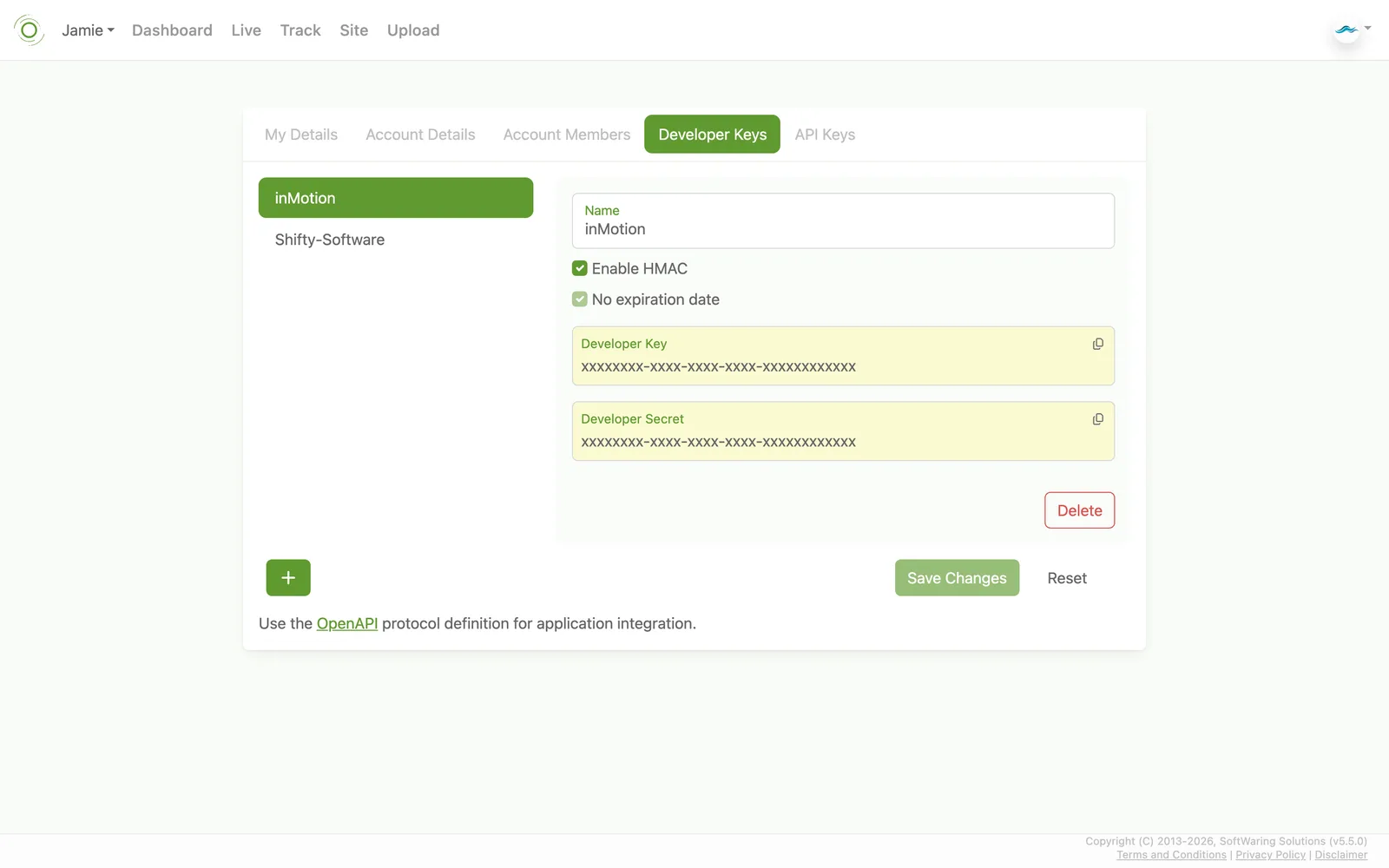
Choose Developer Keys from the account dropdown menu to create a developer key/secret pair. Use the + button to add a new key, give it a name, optionally enable HMAC signing, and set an expiration date (or leave it as No expiration date for a long-lived key). Copy the key and secret using the icon alongside each field - the secret is only ever shown here.
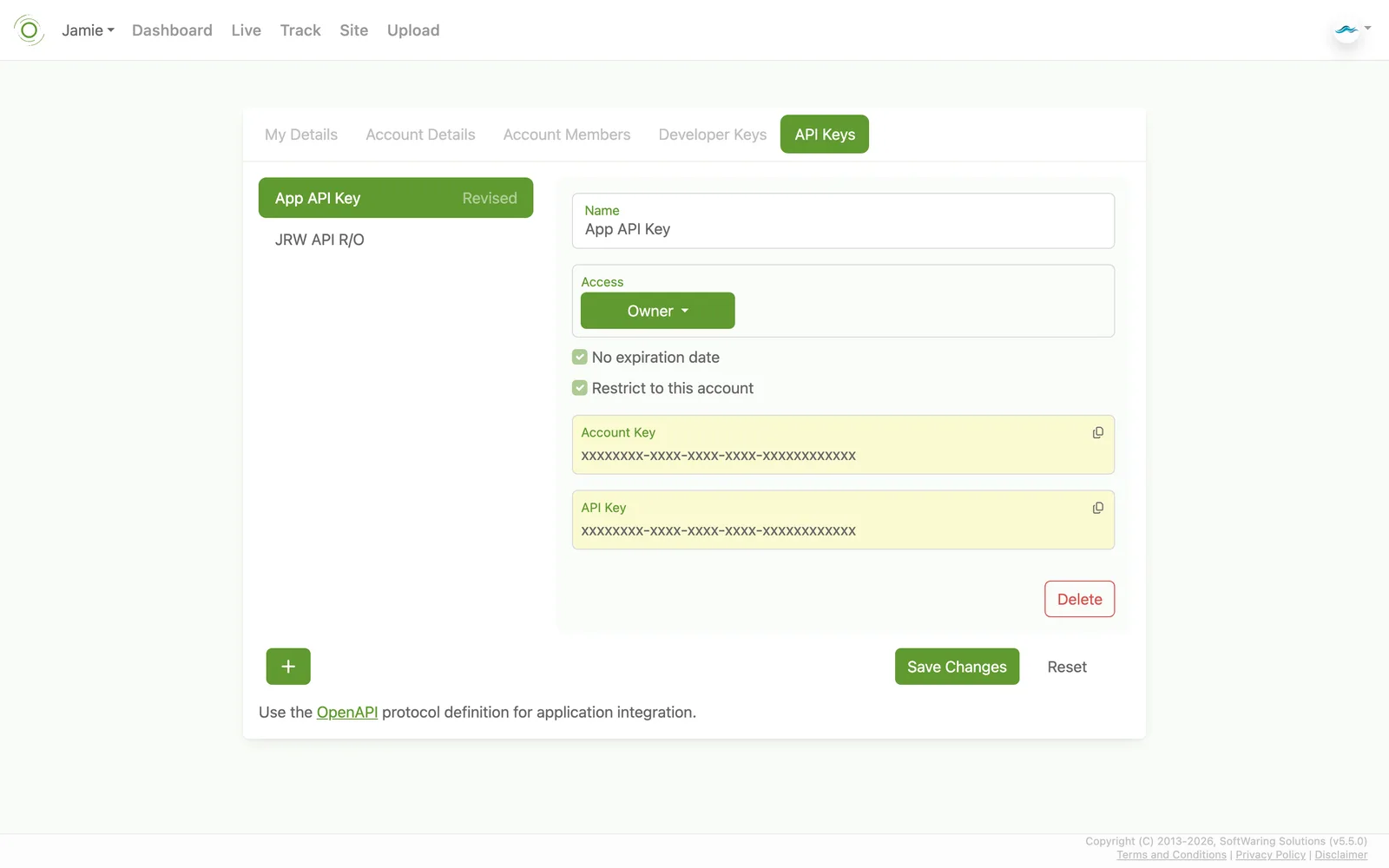
API Keys, also under the dropdown menu, let you generate an account key and API
key pair scoped to a specific access level (None, Consumer, Contributor, or Owner) for a
third-party integration - handy when you want to grant a device or service access without
sharing your own login. Give the key a name, choose its access level and optional
expiration, and save. Each settings tab links to the OpenAPI protocol definition,
which documents how to use these keys in your own application.
Getting data in
- REST API - Create activities and streams, then write records directly, whether you're streaming live readings or backfilling historic data.
- Batch updates - Submit records from multiple devices in a single API call to reduce round trips for high-frequency or multi-sensor deployments.
- File upload - CSV, GeoJSON and Shapefiles can be uploaded directly through the web application without writing any integration code.
SDKs and examples
A Python SDK is available for integrating scripts, data pipelines and IoT gateways with
inMotion — see the
Python SDK API documentation. A NodeJS SDK is
planned — please
get in touch
if you'd like early access.
- Weather stations - Import historical or live climatology readings as Site activities.
- Industrial sensors - Stream high-frequency sensor data (e.g. load cells) and upload windowed statistics for long-running equipment monitoring.
- Fleet & asset tracking - Push GPS and telemetry from vehicles or other moving assets as Track activities.
Data Logger
A Python-based data logging platform is available for running a station of sensors
unattended - on a Raspberry Pi, gateway, or similar device - and publishing readings
straight to inMotion as a Site activity. Variables, sensors,
and publishing are all declared through a single YAML config; support for new hardware is
added as a plugin, without modifying the core package.
- BLE profiles - Bluetooth sensors are described using the same Device Config format as My Device Configs, so one profile drives both the logger and inMotion Track's generic BLE reader - define a device once and read it from either.
- Reliable publishing - a durable local retry queue holds readings on disk through a flaky connection or a process restart, so nothing is lost, and an optional permanent local log keeps every reading for offline review.
- Derived & windowed statistics - compute running totals and corrections the instant a reading arrives, alongside periodic aggregates (mean, min, max, circular mean) over a rolling window.
The data logger isn't published to a package index yet - as with the NodeJS SDK, please
get in touch
if you'd like access.
MCP server for LLM clients
An MCP server is
available for querying inMotion activity data from LLM clients
such as Claude. All you need to connect is an API key.